
If you pay through the app store (charged by Apple or Google Play)
First, check to see that Surfline is listed as an active subscription using the iOS/Android instructions below.
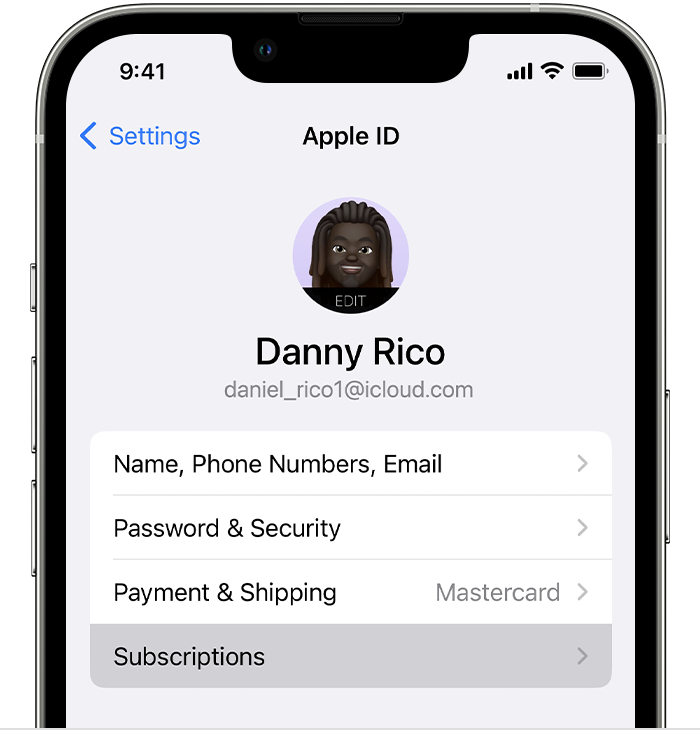
How to check from iPhone/iPad
- Open the Settings app.
- Tap your name.
- Tap Subscriptions.
How to check in Google Play Store (on an Android device):
- Open the Google Play app
- At the top right, tap the profile icon.
- Tap Payments & Subscriptions and then Subscriptions.
You can restore the subscription you purchased to the account you are logged in with via your account settings (click Account bottom right of the app screen and scroll down)
If you want to know the email that previously had your subscription to find your old favorites & Sessions, contact support@surfline.com after you've pressed the subscribe button from the same email you were logged in under and ask for a human.
If you pay on the website (charged by us directly)
Your subscription is directly connected to the email address you used to subscribe. You might not have Premium access because:
-
A subscription payment failed
- Verify you can see the expired subscription at https://www.surfline.com/account/subscription/
- Resubscribe on https://www.surfline.com/upgrade/
-
You subscribed under a different email address.
- Check https://www.surfline.com/account/subscription/, can you see your correct billing history?
- If not, log out and try logging in under a different address. Use the password reset link: https://www.surfline.com/forgot-password
- Email support@surfline.com with a copy of a renewal charge on your statement and ask for a human
- Check https://www.surfline.com/account/subscription/, can you see your correct billing history?
-
You subscribed under a typo email address (.con, gmail vs googlemail, etc)
- Email support@surfline.com with a copy of a renewal charge on your statement and ask for a human
If you just upgraded your subscription or tried a free trial via the iOS app
If you pay through the iOS app, upgrading and downgrading your subscription will depend on how Apple's app store subscription system works.
- At the moment you upgrade your subscription (even on a trial basis) via your Apple ID, you'll be refunded the remaining balance of the subscription you held up to now
- You'll be charged full price for the higher subscription tier immediately (or at the end of the free trial)
- If the upgrade payment fails (or cancel the free trial) you revert back to a free member and will need to manually rejoin your old lower subscription tier
- This is only true for iOS Apple ID subscriptions, not subscriptions made directly on Surfline.com or via Google Play. For subscriptions charged by Google or Surfline directly, your remaining balance goes towards the upgrade payment or reinstates your lower-tier subscription if the upgrade doesn't process.
Related to